How to Optimize Your LinkedIn Profile to Increase Views
Already creating LinkedIn content?
This is going to be easy and make a big difference to your audience retention.
Here’s the situation:
You’re posting consistently, sharing value, building visibility and it’s working. People are clicking through to your profile.
So… what happens next?
Optimize your LinkedIn Activity Section!
You’ll hear a lot of LinkedIn profile optimization tips about having a strong banner and sure, that matters. But the truth is, most people landed on your profile because of your content.
They’re not trying to decide whether to buy from you.
They’re trying to decide whether to follow you.
And what do they want to see to make that decision?
More of the content that got them interested in the first place—easily accessible, in one place, so they can confirm those insights weren’t just a one-off.
And where do they go to find it? Your Activity section.
How to Optimize Your Profile on LinkedIn for Better Retention
Let’s take a closer look at your LinkedIn profile’s Activity section.
By default, it shows your most recent posts in reverse chronological order. But if you consistently create high-value content in a specific format—like videos, carousels, or newsletters—you’re leaving opportunity on the table by sticking with the default setting.
Why?
Because what visitors see here frames their entire impression of your expertise.
Think about how you browse a YouTube channel. You don’t spend time reading the creator’s bio, you go straight to the video tab to get a sense of their style, thinking, and relevance.
Your LinkedIn Activity section should work the same way.
It should act like a curated content library, designed to turn profile views into followers.
The Step-by-Step Guide on How to Optimize LinkedIn
If you're already investing time in content creation, this one tweak will make your efforts more evergreen. It creates a content library that’s always visible—regardless of when someone lands on your profile.
Here’s how to do it:
- Go to your LinkedIn profile.
- Scroll down to your Activity section.
- In the top right corner of that section, you’ll see an “Edit” button (on desktop).
- Click it, and a menu will appear where you can choose which content format to showcase:
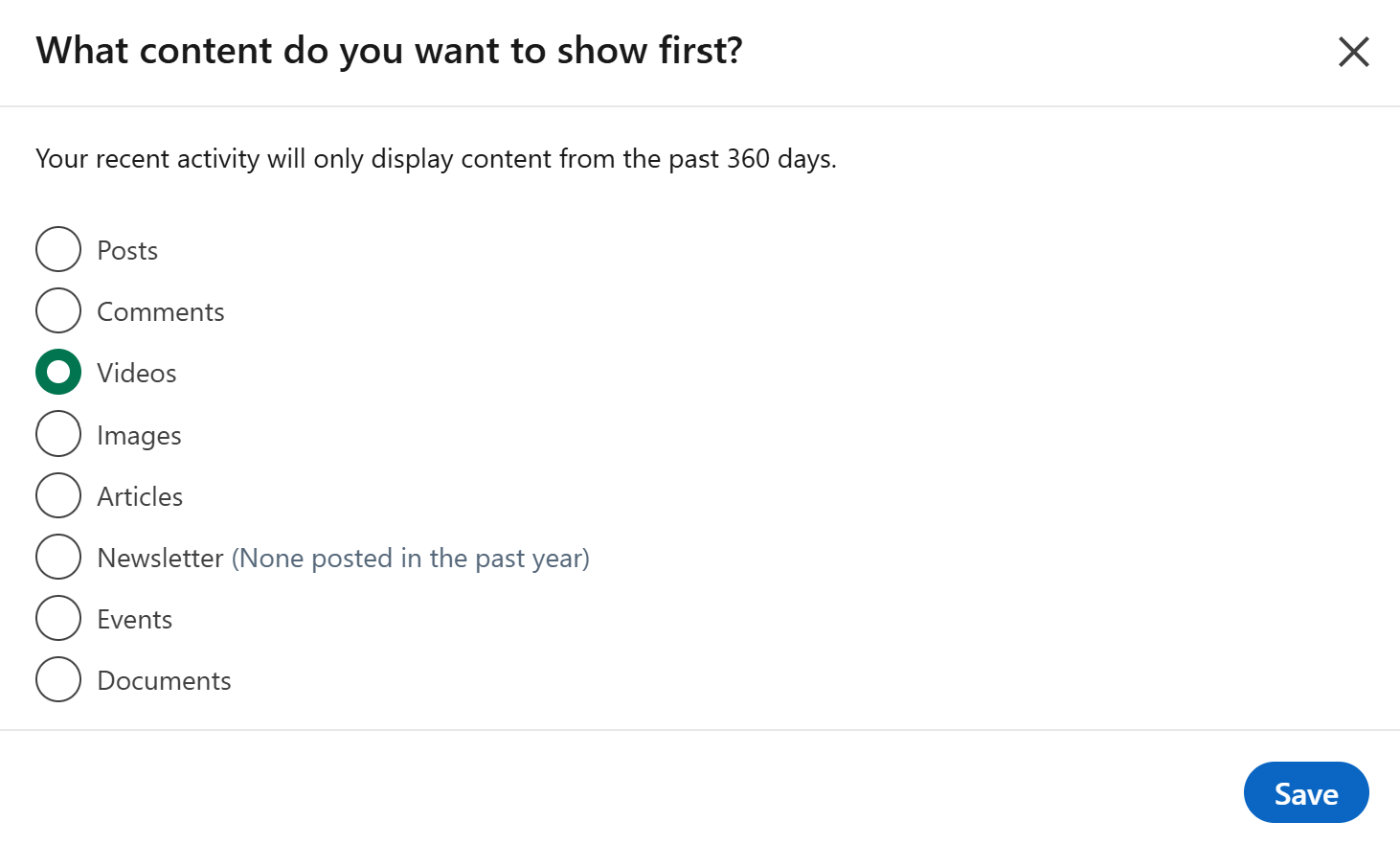
- Select the format that best aligns with your strengths and the kind of content that your creating
Click Save, refresh your profile—and just like that, your feed becomes instantly more engaging and relevant.
It gives your audience exactly what they need to answer the real question:
“Do I want to follow this person?”
What Changes When You Do This?
This small change delivers two big benefits:
1. Turns profile views into followers
You’re showcasing the most engaging, relevant version of your content—keeping visitors on your profile longer and helping them decide to follow you, faster.
2. Extends the shelf life of your content
Instead of letting valuable posts disappear into the feed, this optimisation gives them a permanent spotlight—boosting engagement on older content and continuing to deliver value over time.
ABOUT US
DIGITAL MARKETING CONSULTANTS
Tomorrow embed inside $1M–$10M professional services to turn complex expertise into high-converting content systems that capture attention and drive growth.